How to Manage Your Billing and Get Invoices
Follow these two simple steps to access your JancisRobinson.com membership details, manage your billing information, and download your invoices or receipts.
Step 1: Access Your Billing Portal
-
Log in to your JancisRobinson.com account.
-
Click the “MY ACCOUNT” button located in the top-right corner of the website.
-
On your account dashboard, look for the link that says “Manage subscription and billing information” (as highlighted in your account screenshot).
-
Click on this link to be securely taken to your dedicated Billing Portal.
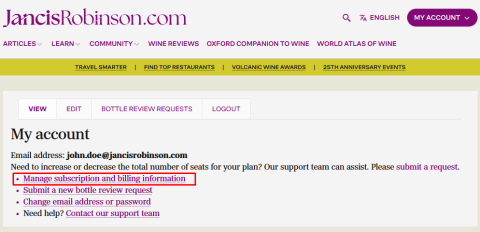
Note: If you do not see the “Manage subscription and billing information” link, it may indicate that you do not currently have an active subscription or recorded payment. If you believe this is incorrect, please reach out to our support team for assistance.
Step 2: Manage Your Details in the Billing Portal
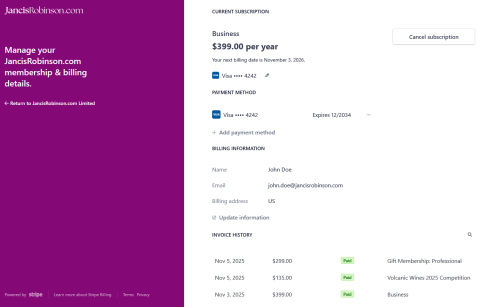
Once inside the Billing Portal, you will find four main sections:
-
Current Subscription: Displays your active subscription plan and the next billing date. You can also cancel your subscription from this section.
-
Payment Method: Shows your current payment method(s). You can update an existing card or add a new payment method here.
-
Billing Information: Contains your name, email, and billing address. Click “Update information” to make any necessary changes to your contact or billing details.
-
Invoice History: This is a comprehensive list of all your invoices and payments.
-
To view or download the detailed invoice and its receipt, simply click on the invoice in the list (e.g., the date or amount) to open the file.
-